Accounting · Invoicing · Stock · Payroll

Run the whole business on one set of books.

Sell, buy, hold stock and pay your people in one system — and the accounts keep themselves up to date.

  • 3 months free
  • No card required
  • Every entry balances
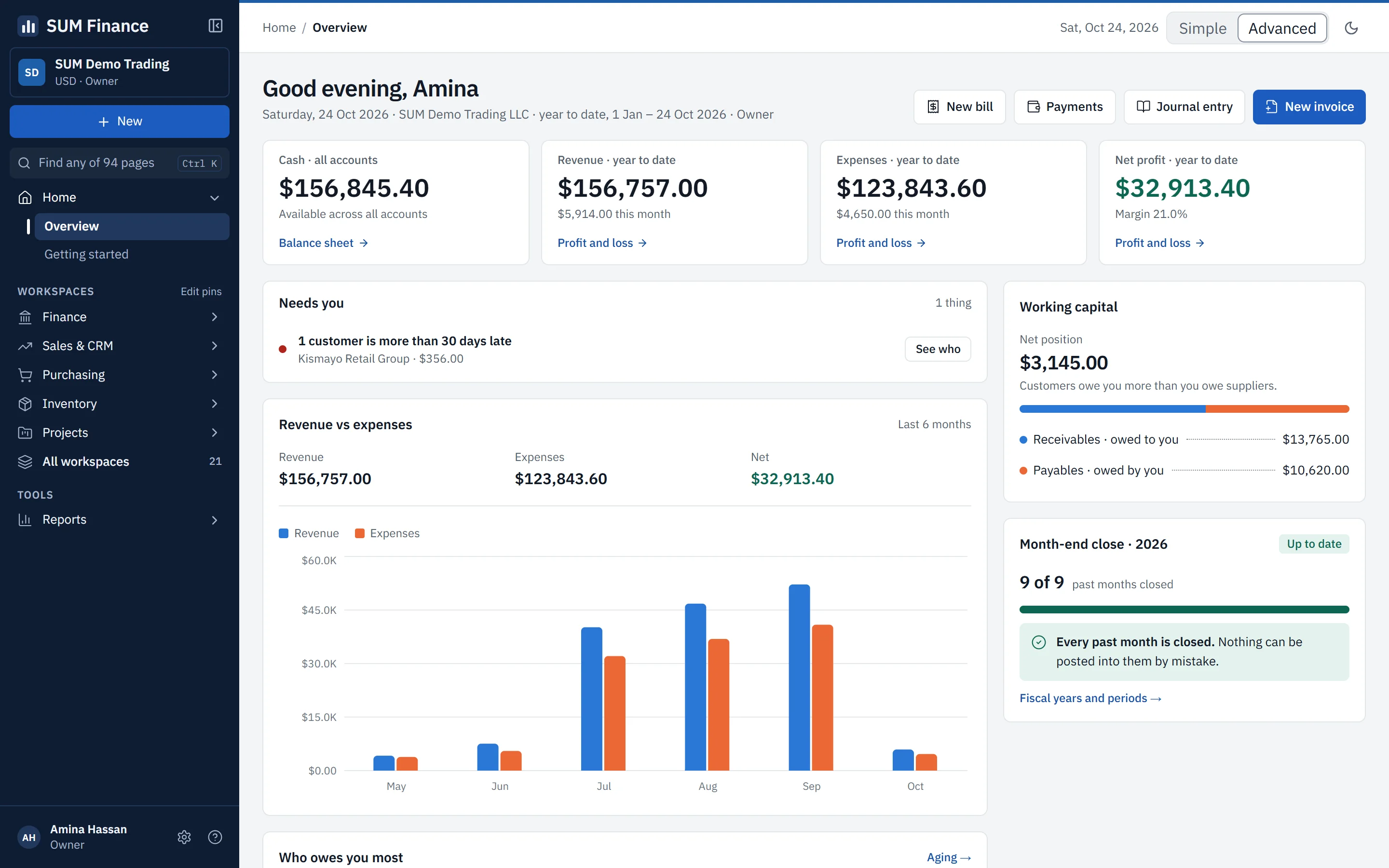
The SUM Finance dashboard: cash, revenue, expenses and net profit for the year to date across the top, a six-month revenue against expenses chart, a reminder that one customer is more than 30 days late, working capital, and a month-end panel showing every past month closed.

Set up for the way your business works

Tell us your trade when you sign up and the sections it needs are switched on. The rest stays out of the way.

One system

Everything a growing business runs on

Each part posts to the same books, so nothing has to be copied from one place to another.

  • Accounting & reports

    A real double-entry ledger, with profit and loss, balance sheet, cash flow and trial balance read straight from it.

  • Invoicing & getting paid

    Invoices, credit notes and recurring invoices, with each payment matched to the invoices it settles.

  • Purchasing & suppliers

    Purchase orders, goods received and supplier bills checked against each other before you pay.

  • Stock & warehouses

    Stock across several warehouses, batches with expiry dates, and the cost of every item worked out for you.

  • Point of sale

    A counter till with shifts and an end-of-shift cash-up, on the same stock and the same books.

  • Payroll & people

    Pay runs checked by a second person before they are paid, tax bands you set, and a payslip for everyone.

Plus projects and time billing, fixed assets, bank reconciliation, multi-currency and multi-company — and manufacturing or fund accounting, switched on only when you need them.

A closer look

Invoicing

Get paid on time

Open your receivables and see who owes you and how late they are. Every invoice and payment goes into the books as it happens — nothing to re-type at month end.

  • Overdue invoices and ageing at a glance
  • Customer statements as at any date
  • Recurring invoices that raise themselves
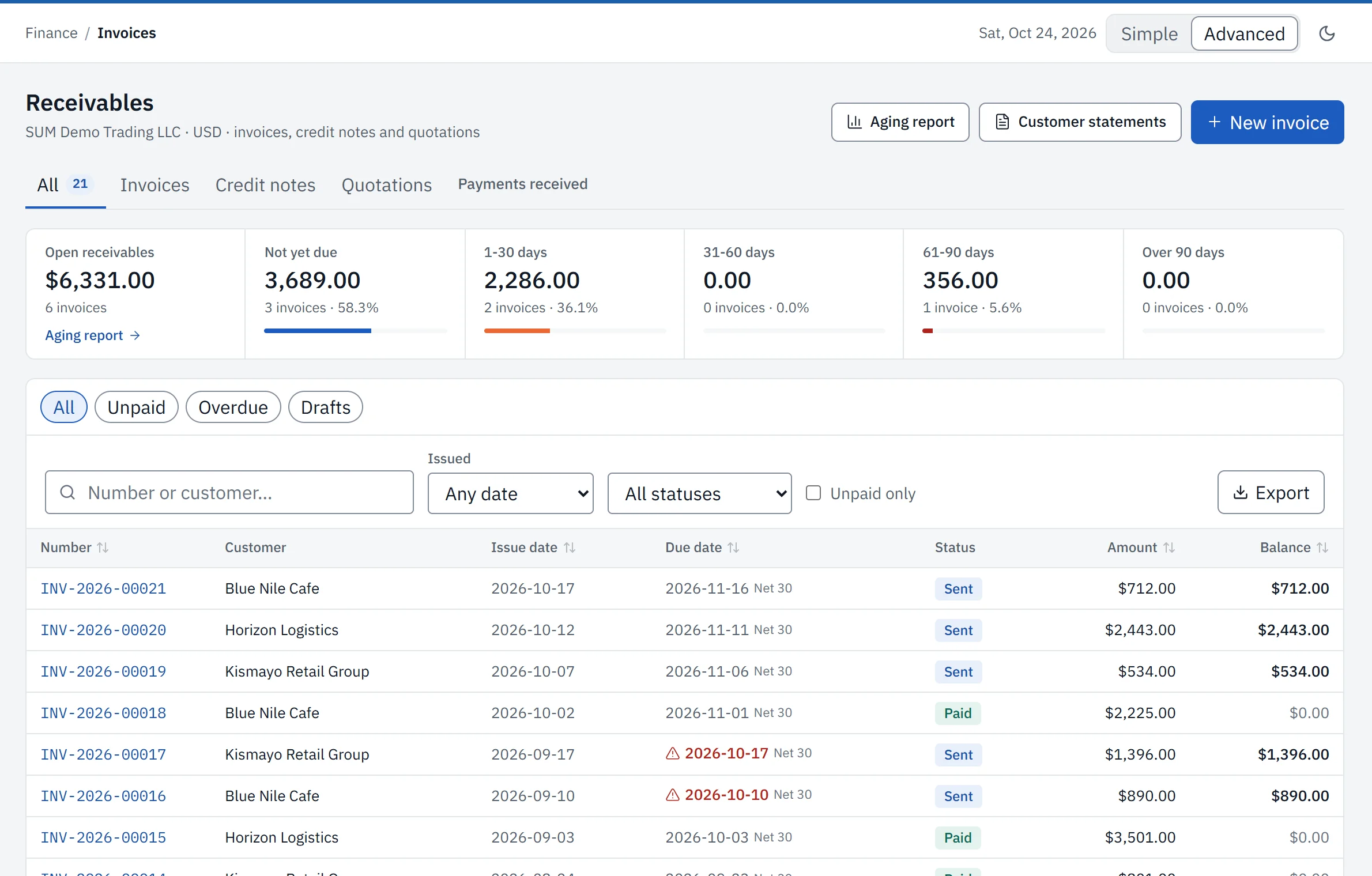
The SUM Finance receivables screen: open receivables split into not yet due, 1–30, 31–60, 61–90 and over 90 days, above a list of invoices with their customer, due date, status and balance. Two overdue due dates are flagged in red.

Reporting

Reports you can stand behind

Every statement is read straight from the ledger, so your profit and loss, balance sheet and cash flow always agree with each other.

  • Profit and loss, balance sheet and cash flow
  • Export to PDF or Excel, or print
  • Months that close — and stay closed
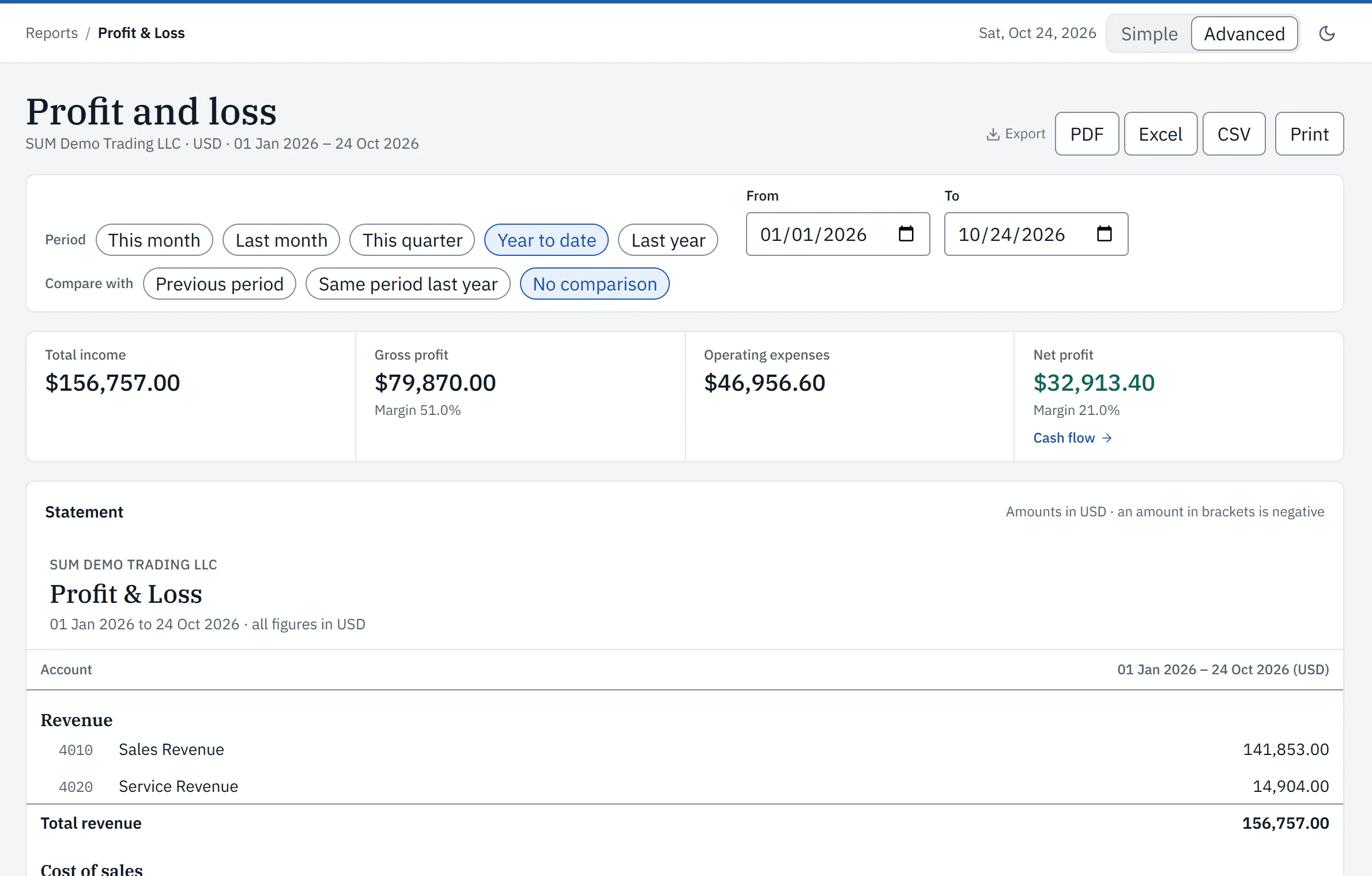
The SUM Finance profit and loss statement for the year to date: total income, gross profit, operating expenses and net profit across the top, with PDF, Excel, CSV and Print export buttons and the statement below.

Point of sale

A till that keeps the books for you

Ring up a sale at the counter and the invoice, the payment and the stock all move together.

  • Scan a barcode or search by name
  • Shifts with a counted float and a cash-up
  • Stock comes off automatically with every sale
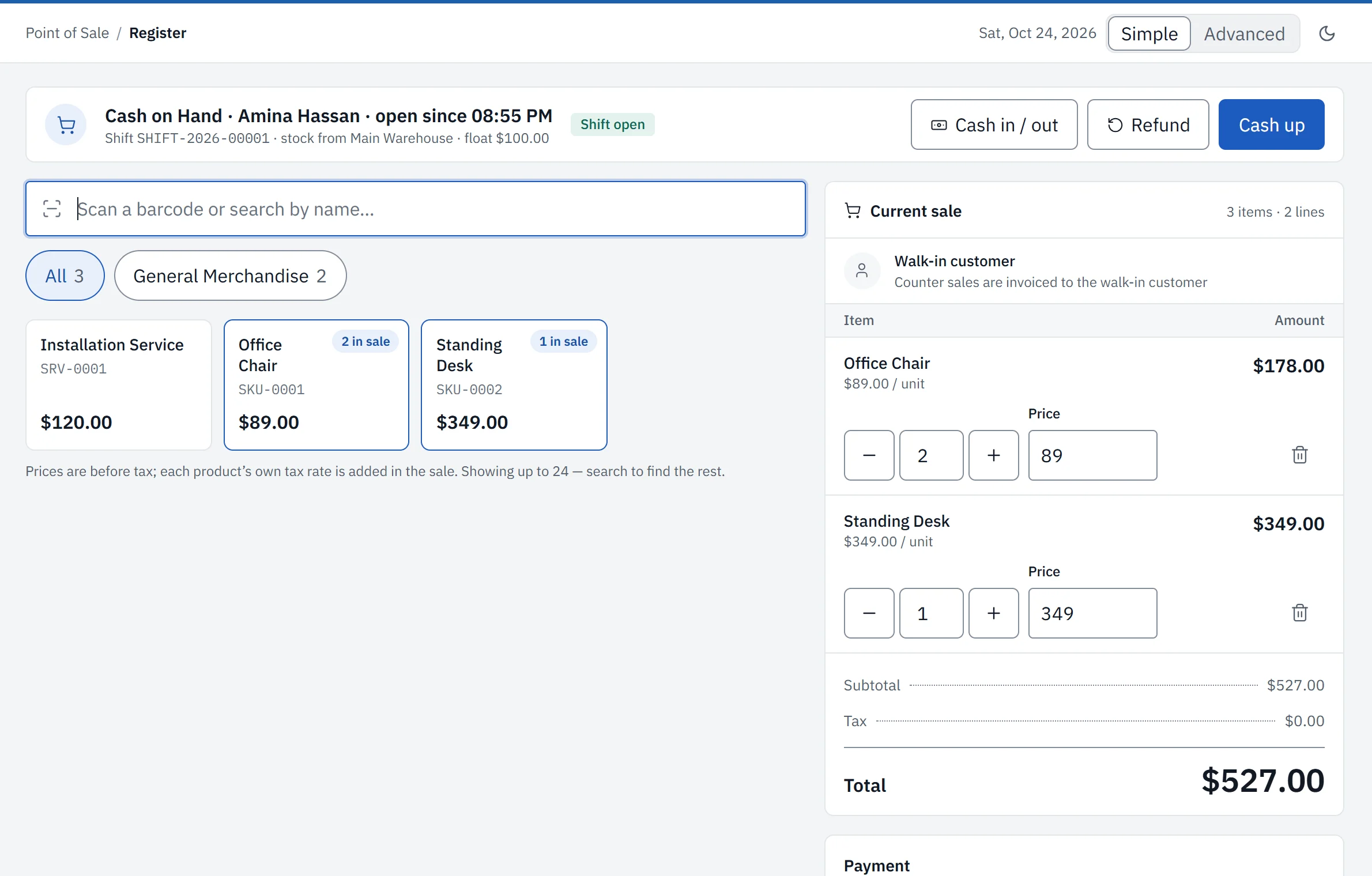
The SUM Finance point-of-sale till: a barcode search box and product tiles on the left, and the current sale on the right with two items, a subtotal and a Charge button.

Built to be trusted

Books your accountant can defend

The rules are in the system, not in a staff handbook — so the numbers cannot move behind your back.

  • Every entry balances

    Every invoice, bill, payment and pay run posts a balanced double entry. If it does not add up, it does not post.

  • Corrections are reversals

    A posted entry is never quietly edited. It is reversed, and the original stays on the record.

  • Closed months stay closed

    Nothing can be posted into a closed month, and a month will not close while drafts are still open in it.

  • An audit trail

    Administrative changes are logged with who made them and when, and approvals can stand in front of key actions.

  • Role-based access
  • Two-factor sign-in
  • Encrypted in transit

For accountants

Bring your accountant — or find one here

Give your accountant a role on your organization and they work in your books directly. No exports, no emailed spreadsheets.

Are you an accountant?

The SUM Finance Accountant Network matches verified accountants with companies that need one. Free to join, nothing taken from what you are paid, and you choose which work to accept.

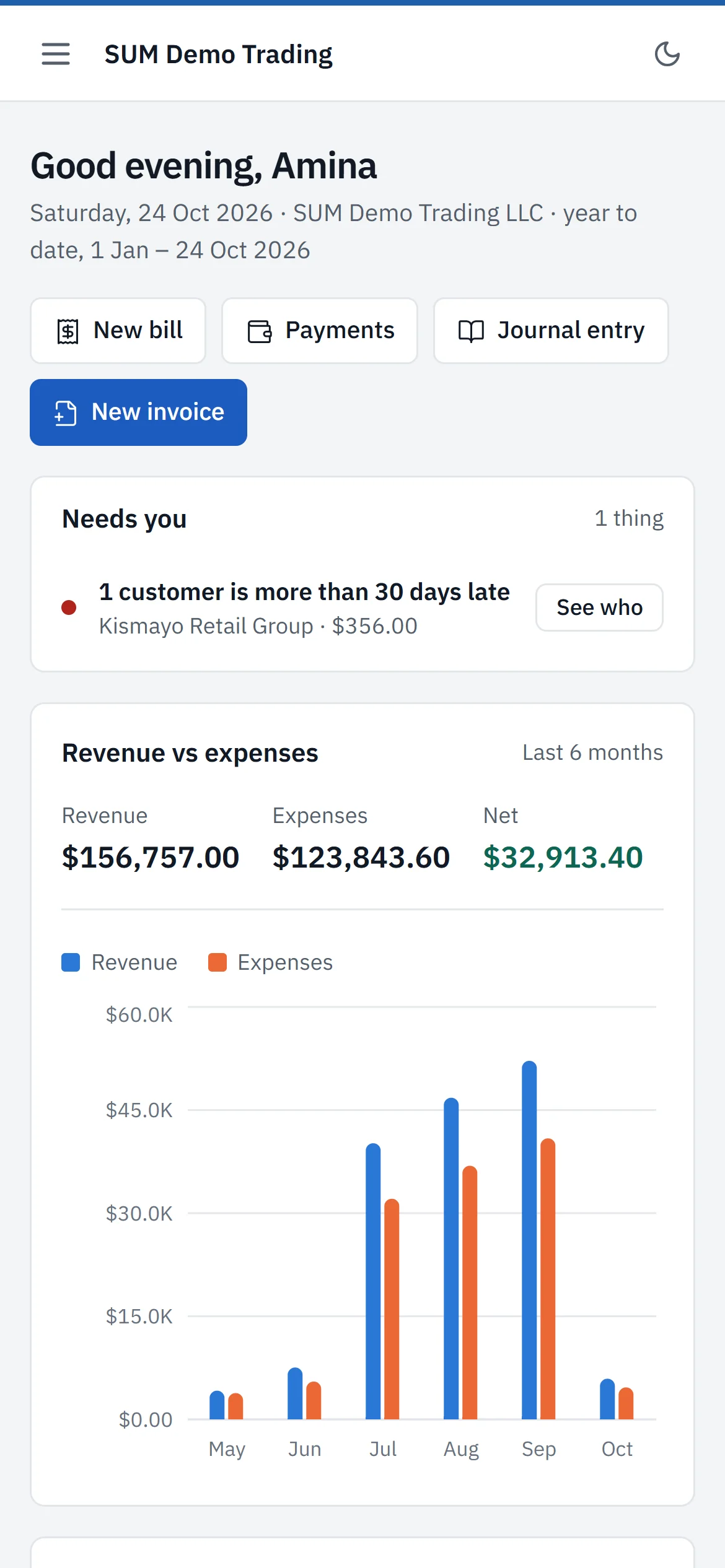
The SUM Finance dashboard on a phone: quick buttons for a new bill, payments, a journal entry and a new invoice, a note that one customer is more than 30 days late, and the revenue against expenses chart.

Runs in the browser — on your phone too.

Pricing

3 months free, then one simple plan

One subscription for the whole organization — every module, every company, every user. The monthly figure is shown in your account, beside the bank details it is paid to.

SUM Finance Standard

3 months free

from the day you register — then one monthly plan

Start free for 3 months
  • Every module, with nothing held back for a higher tier
  • Unlimited users and companies under one organization
  • No setup fee and no per-user charge
  • Bring your opening balances in, with a dry run first

No card required. Payment is by bank transfer, and your books stay open for 7 days after a period ends while a transfer clears. If a subscription lapses, nothing is deleted.

Questions

Before you ask

Something else on your mind? Ask us directly — a person answers.

Is this really double-entry accounting?

Yes. Every document raised anywhere in the system — an invoice, a bill, a payment, a stock movement, a pay run — posts a balanced journal entry, and the trial balance, profit and loss and balance sheet are read out of that ledger rather than assembled beside it. Nothing posts unless debits equal credits, and a posted entry is reversed rather than edited.

Can I run more than one company?

Yes, and at no extra cost. An organization holds as many companies as you need, each with its own set of books, its own document numbering and its own periods. People are granted access company by company, so a branch manager sees one and the group accountant sees all of them.

What does it cost?

The first 3 months are free from the day you register. After that it is one monthly subscription for the whole organization — every module, every company, every user, no setup fee and no per-seat charge. The figure is shown in your account beside the bank details it is paid to. Payment is by bank transfer: you record the transfer, we confirm it against the statement, and your access extends.

Can I move my existing books across?

Yes. Opening receivables, opening payables and opening stock come in by bulk upload, and every import runs as a dry run first, showing exactly what would be created and what would be rejected before a single row is committed.

Do you work with my accountant?

Yes, and you can find one here if you do not have one. Give your accountant a role on your organization and they work in your books directly. The SUM Finance Accountant Network also matches verified accountants, trained on this system, with companies that need one — free for the accountant to join, and every engagement is theirs to accept or decline.

What is not built yet?

A quotation can be raised and printed but not yet converted into an invoice — you raise the invoice separately. Notifications and a general documents library are in the data model and have no screens. These are stated here rather than left to be discovered after you have moved your books across.

Try it with your own books.

Setting up takes a few minutes, and the first 3 months cost nothing.